


Product Name: GIZGA Essentials 2-in-1 Universal Stylus Pen (Black)
My Rating: ⭐ 4.5/5
Introduction
If you frequently use touchscreen devices for browsing, writing, taking notes, drawing, or everyday navigation, a good stylus pen can make things much easier. The GIZGA Essentials 2-in-1 Universal Stylus Pen is designed to work with a wide range of capacitive touchscreen devices, including iPads, iPhones, Android smartphones, tablets, laptops with touchscreens, Microsoft Surface devices, and Chromebooks.
I purchased and used this stylus pen to see how well it performs in everyday situations. This is not a promotional review. I am sharing my genuine experience based on using the product and comparing its actual performance with the features advertised by the manufacturer.
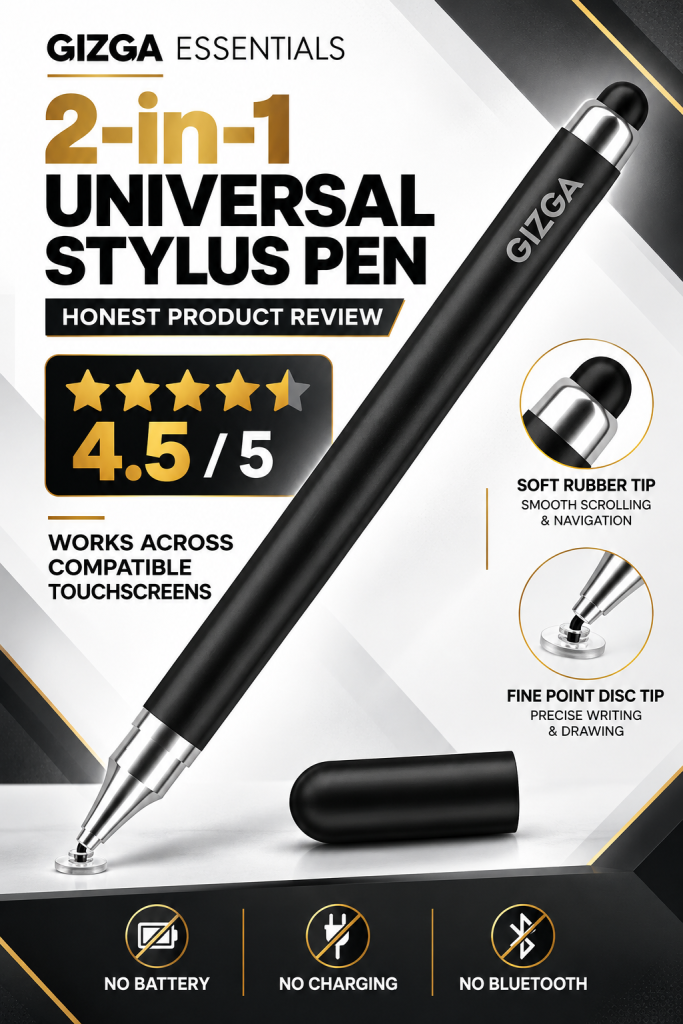
My overall experience has been very positive. The stylus works well across different touchscreen devices, is easy to use, and does not require charging or Bluetooth pairing. Considering its convenience and versatility, I would rate it 4.5 out of 5 stars.
Product Overview
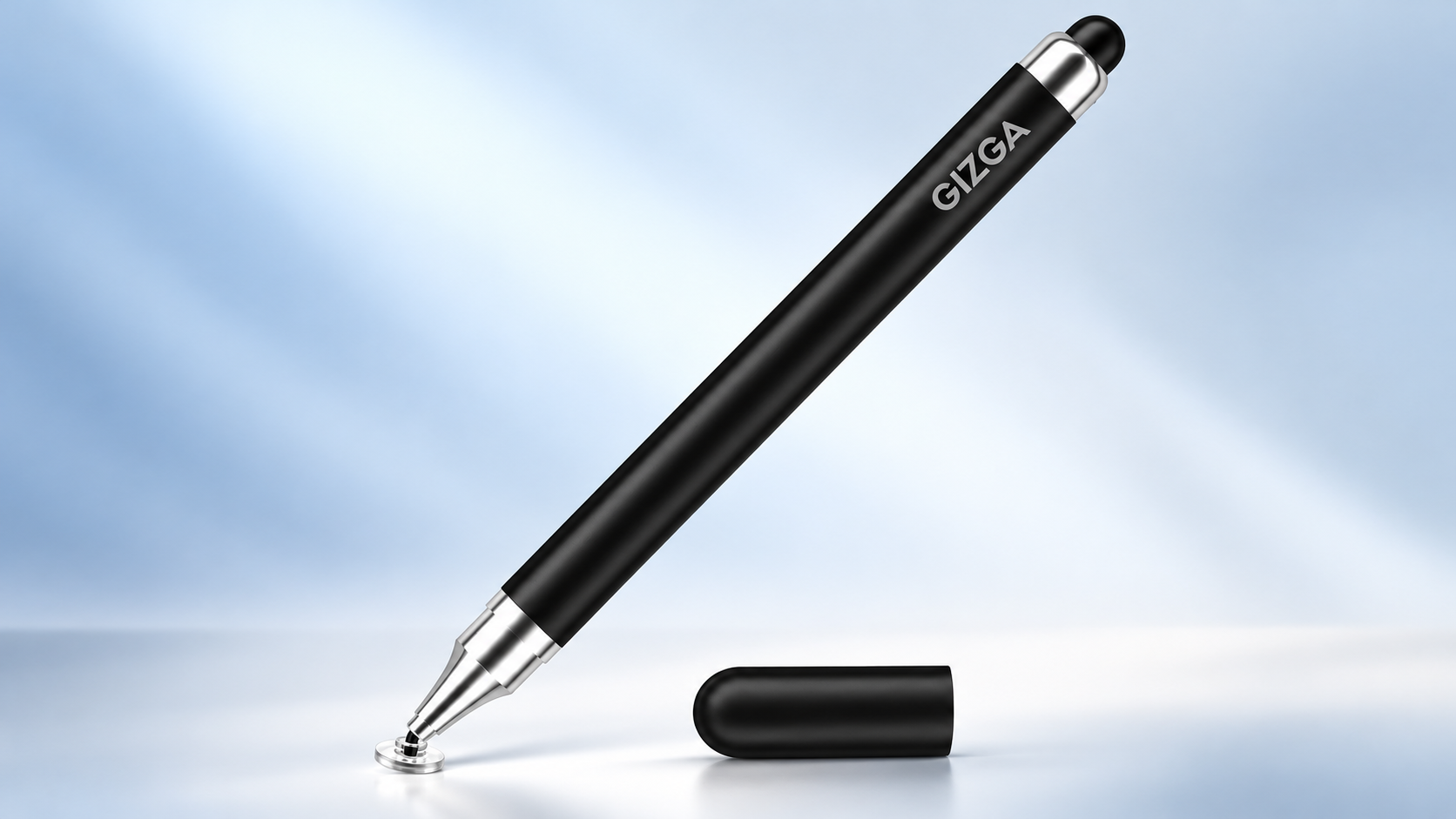
The GIZGA Essentials 2-in-1 Universal Stylus Pen comes with two different tips to support different touchscreen activities. One end features a fine-point transparent disc tip for more precise tapping, writing, sketching, and annotation. The other end features a soft rubber tip for smooth scrolling, navigation, and general touchscreen interaction.
Its lightweight aluminium alloy body gives it the appearance and feel of a regular pen. It also comes with a protective cap to help keep the tip safe when the stylus is not in use.
One of its biggest advantages is its simple operation. There is no battery, charging cable, Bluetooth connection, or complicated setup. Simply remove the cap and start using it on a compatible touchscreen.
Key Features of the GIZGA Essentials Stylus Pen
1. Two Tips in One Stylus
The dual-tip design is one of the most useful features of this product.
The fine-point disc tip is suitable for tasks that require better visibility and control, such as writing short notes, sketching, annotating documents, tapping small on-screen elements, and signing digital forms.
The soft rubber tip is useful for everyday activities such as scrolling through webpages, navigating apps, browsing social media, and selecting items on the screen.
Having both options in a single pen makes it convenient for different types of touchscreen use.
2. Precise Touchscreen Control
The transparent disc tip helps you see the area where the tip touches the screen, making it easier to position your taps accurately.
It can be useful for writing, drawing simple diagrams, marking up documents, and performing tasks that are less convenient with a finger.
However, this is a standard capacitive stylus rather than an active digital pen. Its precision depends on the tip, screen, and application, so it should not be expected to provide advanced features such as pressure sensitivity or palm rejection.
3. No Battery, Charging, or Bluetooth Required
One feature I particularly appreciate is that the stylus does not require a battery or charging.
There is no need to worry about battery levels, charging cables, pairing, or connectivity issues. It is ready to use whenever you need it.
This simple, hassle-free design makes it suitable for everyday use at home, in the office, at school, or while travelling.
4. Wide Compatibility with Touchscreen Devices
The product is designed for a broad range of capacitive touchscreen devices.
Compatible device categories include:
- Apple iPad, iPad Pro, iPad Air, and iPad mini.
- Apple iPhone models with capacitive touchscreens.
- Android smartphones and tablets.
- Microsoft Surface devices with compatible touchscreens.
- Chromebooks with compatible touchscreens.
- Other smartphones, tablets, and devices using capacitive touchscreens.
In my experience, the stylus works well across touchscreen devices, including mobiles, tablets, and touchscreen laptops.
Important: Although the stylus is marketed as universal, it is a passive capacitive stylus. It does not offer the specialised functionality of device-specific active pens, such as the Apple Pencil or Microsoft Surface Pen. It also will not work as a pen on a laptop that does not have a touchscreen.
5. Lightweight Aluminium Body
The stylus features an aluminium alloy body that is lightweight and easy to handle.
Its pen-like design makes it comfortable to carry and convenient to use for everyday tasks. The protective cap helps shield the tip from dust and accidental damage when stored in a bag, pocket, or desk drawer.
It is a practical design for people who want a simple stylus without unnecessary electronic components.
6. Smooth Scrolling and Easy Navigation
The soft rubber tip is intended for smooth scrolling and basic touchscreen navigation.
It can be used for browsing websites, moving through documents, opening applications, selecting options, and interacting with the screen without using your fingers directly.
The stylus can also be convenient when you want to reduce direct finger contact with the screen, although it cannot guarantee that the screen will remain completely free of fingerprints or smudges.
7. Useful for Work, Study, and Entertainment
The GIZGA Essentials stylus can be useful in several everyday situations.
For students: It can help with navigating online classes, making simple handwritten notes, highlighting documents, and interacting with educational applications.
For professionals: It can be used to sign forms, annotate documents, select items on a touchscreen, and navigate presentations or work applications.
For creative users: It is suitable for casual sketching, simple drawing, and basic digital annotation.
For everyday users: It makes browsing, scrolling, tapping, and navigating touchscreen devices convenient.
For advanced digital art or extensive handwriting, however, an active stylus designed for the particular device may be a better choice.
My Actual Usage Experience
After using the GIZGA Essentials 2-in-1 Universal Stylus Pen, I found that it performs well for the everyday touchscreen tasks it is designed to handle.
The stylus works well on compatible touchscreen devices, including mobile phones, tablets, and touchscreen laptops. I particularly like the fact that I can use it without charging or connecting it through Bluetooth.
The two-tip design is also convenient because the fine-point disc tip and rubber tip serve different purposes. The lightweight construction makes it easy to carry and use whenever required.
Another positive aspect is that the stylus is straightforward to operate. There is no learning curve or setup process involved.
Based on my experience, the product does what it is advertised to do for general capacitive touchscreen interaction. It is a practical choice for someone who wants a simple, multipurpose stylus rather than a feature-rich digital pen.
My rating is 4.5 out of 5 because of its useful dual-tip design, broad compatibility, ease of use, and battery-free operation.
Does It Work on Mobile Phones, Tablets, and Laptops?
Yes, it works with compatible capacitive touchscreen devices.
The stylus is suitable for touchscreen mobile phones, tablets, and laptops. It can be used for basic navigation, tapping, scrolling, writing, and drawing.
However, compatibility depends on the device having a touchscreen that supports capacitive input. A regular laptop without a touchscreen cannot be operated with this stylus as a writing or pointing tool.
It is also worth remembering that this stylus does not require special software, Bluetooth, or device pairing. It functions through the touchscreen’s capacitive sensing technology.
Does It Protect the Screen from Scratches?
The stylus is designed to provide a more screen-friendly way to interact with a touchscreen than using hard objects. Its tips are intended for touchscreen use, and the product description highlights their screen-friendly design.
Nevertheless, no stylus can guarantee complete protection against scratches. Dust, grit, damaged tips, or excessive pressure can potentially damage a screen. Keeping both tips clean and checking them regularly is a sensible precaution.
The stylus may also help reduce direct finger contact, but it does not eliminate fingerprints or smudges entirely.
Product Specifications
Here are the product details provided by the manufacturer and product listing.
| Specification | Details |
|---|---|
| Brand | GIZGA essentials |
| Product Name | 2-in-1 Universal Stylus Pen |
| Model Number | GZ-CS-01-BLK |
| Colour | Black |
| Product Type | Passive capacitive touchscreen stylus |
| Tip Type | Fine-point disc tip and soft rubber tip |
| Body Material | Aluminium alloy |
| Battery Included | No |
| Battery Required | No |
| Bluetooth Required | No |
| Charging Required | No |
| Number of Packs | 1 |
| Unit Count | 1 piece |
| Compatibility | Compatible capacitive touchscreen devices |
| Country of Origin | China |
| Manufacturer | DONGGUAN ARCHER TECHNOLOGY LIMITED |
| Manufacturer Address | Building 25, No. 77, Shilong Road, Guancheng Street, Dongguan City, Guangdong Province, China |
| Warranty | 6 months, as stated in the product listing |
| My Rating | 4.5/5 |
Package Contents
According to the product listing, the package includes:
- One GIZGA Essentials 2-in-1 Universal Stylus Pen.
- One user manual.
The product listing also states that the stylus comes with a six-month warranty. For warranty claims, it is advisable to check the seller’s terms and the warranty documentation supplied with the product.
Pros and Cons
Pros
- Two different tips for different touchscreen activities.
- Works with a wide range of compatible capacitive touchscreen devices.
- Suitable for mobiles, tablets, and touchscreen laptops.
- No battery, charging, or Bluetooth pairing required.
- Lightweight aluminium alloy construction.
- Protective cap for the tips.
- Useful for basic writing, drawing, annotation, tapping, and scrolling.
- Simple to use for everyday activities.
Cons
- Does not offer pressure sensitivity.
- Does not provide the advanced functionality of device-specific active styluses.
- Not suitable for laptops without touchscreens.
- Fine handwriting and drawing precision may vary depending on the device and application.
- The passive stylus may not meet the needs of users who require advanced digital art or professional note-taking features.
Is the GIZGA Essentials 2-in-1 Stylus Pen Worth Buying?
If you are looking for a straightforward stylus for everyday touchscreen use, the GIZGA Essentials 2-in-1 Universal Stylus Pen is worth considering.
Its biggest strengths are its dual-tip design, simple operation, lightweight body, and compatibility with a variety of capacitive touchscreen devices.
You do not need to charge it, pair it with your device, or install any additional software. It is a convenient option for basic navigation, casual writing, document annotation, and simple drawing.
However, if you need pressure-sensitive drawing, advanced handwriting recognition, palm rejection, or other specialised features, you should consider an active stylus that is compatible with your specific device.
For general touchscreen use, this product offers a useful combination of convenience and versatility.
Final Verdict: My Honest Review
Overall, I am satisfied with the performance of the GIZGA Essentials 2-in-1 Universal Stylus Pen.
This is my personal review based on actual usage, not a promotional recommendation. The product works well across compatible touchscreen devices, including mobiles, tablets, and touchscreen laptops. Its two tips are useful for different tasks, and the fact that it requires no battery, charging, or Bluetooth connection makes it convenient for everyday use.
The lightweight aluminium body and protective cap are additional practical features. Although it does not replace an advanced active stylus for professional drawing or specialised handwriting tasks, it performs well for its intended general-purpose use.
My final rating: 4.5 out of 5 stars.
I would recommend this stylus to anyone who needs a simple, convenient, battery-free pen for everyday touchscreen interaction.
If your main requirement is a universal stylus for basic writing, tapping, scrolling, and casual drawing across compatible devices, the GIZGA Essentials 2-in-1 Universal Stylus Pen is a practical option to consider.